Tool connections
Information moves between your form, CRM, inbox, calendar or another application.
Quoted after agreeing the scope
Let's talk about itBUSINESS AUTOMATION AND INTEGRATIONS
Connect your business tools and reduce repetitive work. Form data can enter your CRM, a message can create a case and a changed appointment can update the calendar. Together, we agree what runs automatically and what a person checks.
Tell us about your task. We agree scope, price and timing before work starts.
SERVICE SCOPES
Describe your own idea or problem. You don't have to choose a predefined scope or know the technical details.
Information moves between your form, CRM, inbox, calendar or another application.
Less manual copying, report preparation and repetitive administration.
Repairing a broken connection, handling exceptions or extending an existing workflow.
WHAT YOU GET
A description of where information comes from, what happens automatically and when your decision is needed.
Data transfer between agreed systems. We check connection options before quoting.
See which task failed, why it failed and how to retry without duplicating data.
We agree which actions and messages need your approval before execution.
SEE AN EXAMPLE
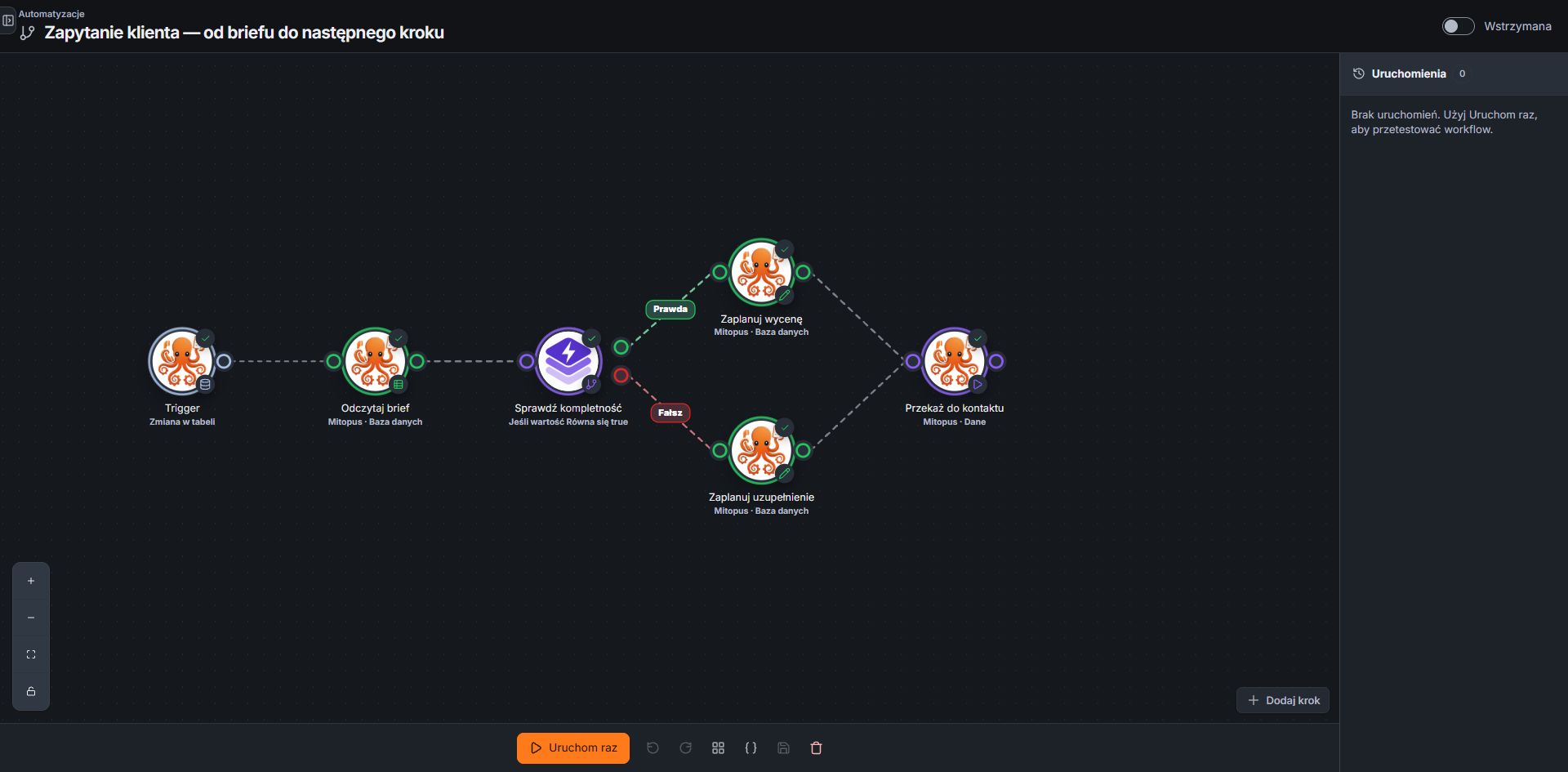
Our actual Mitopus editor shows an example brief workflow: from checking information to the next step. Your implementation is matched to your own systems.
HOW WE WORK TOGETHER
We walk through an example task, from the initial request to completion.
You see how your systems connect and which access implementation requires.
We connect your systems using agreed rules. You check the workflow with test data.
We check valid data, duplicates and failures, then launch the automation and agree further support.
COMMON QUESTIONS
Tell us the system's name and version. We review its documentation and data exchange options, then confirm whether it can connect with your other tools.
Yes, when we agree the recipients, timing and content. We can also start with drafts that you approve before sending.
We start with what your current CRM can do. If it can support the process, we can configure it or connect it to your other tools.
Yes. A first scope can cover answers grounded in approved offer materials and preparation of an enquiry summary. CRM access, bookings and actions need separate integrations. The quote covers knowledge preparation, embedding and testing; API usage and maintenance are separate.
Before implementation, we agree the data needed, access scope and services used. We define which actions need human approval. For the first discussion, a description and anonymised example are enough; do not put passwords or customer data in the chat.
Start with one repetitive task: what triggers it, where the information comes from and the outcome you need. Saving a form submission in your current CRM and reminding someone to reply is a useful example. If the process is unclear, a process map helps; for a straightforward task, we can scope the implementation directly.
NEXT STEP
After checking your tools and agreeing the features needed, we propose a scope and quote.
15 MINUTES · FREEArrange a time by email